


SMILE CENTER • PATIENT CONCIERGE TRAINING
Panoramic X-Ray Training
This module teaches you how to prepare the panoramic X-ray machine, prepare and position the patient, take the image, and properly hand the patient off to the clinical team.
PREPARE FIRST.
CALL THE PATIENT SECOND.
CALL THE PATIENT SECOND.
NEW PATIENT STANDARD
All new patients receive a panoramic X-ray as part of the Smile Center new-patient workflow unless an exception applies.
PREGNANCY EXCEPTION
If the patient is pregnant, may be pregnant, or is unsure, stop and ask the dentist before proceeding.
BEFORE YOU BEGIN
Panoramic X-Ray Terminology
Know the names of the basic equipment and controls before performing the procedure independently.

Panoramic X-Ray Machine
Panoramic X-Ray: A broad radiographic image showing the teeth, jaws, and surrounding structures.
Panoramic X-Ray Machine: The standing machine that rotates around the patient's head.
Bite Block: The positioning piece the patient bites on.
Bite Block Cover: Disposable protective cover placed over the bite block for each patient.
Chin Rest: The part of the machine where the patient's chin is positioned.
Hand Rails / Handles: The handles the patient holds for stability.
Positioning Lamp: The light used to help align the patient.
Lead Apron / X-Ray Shield: Protective garment used according to Smile Center protocol.
Patient Mode: CHILD, MAN, or WOMAN setting.
READY: Prepares the machine for exposure.
Exposure Button: The physical button held while the X-ray is taken.
Artifact: An unwanted object or distortion visible on the X-ray.
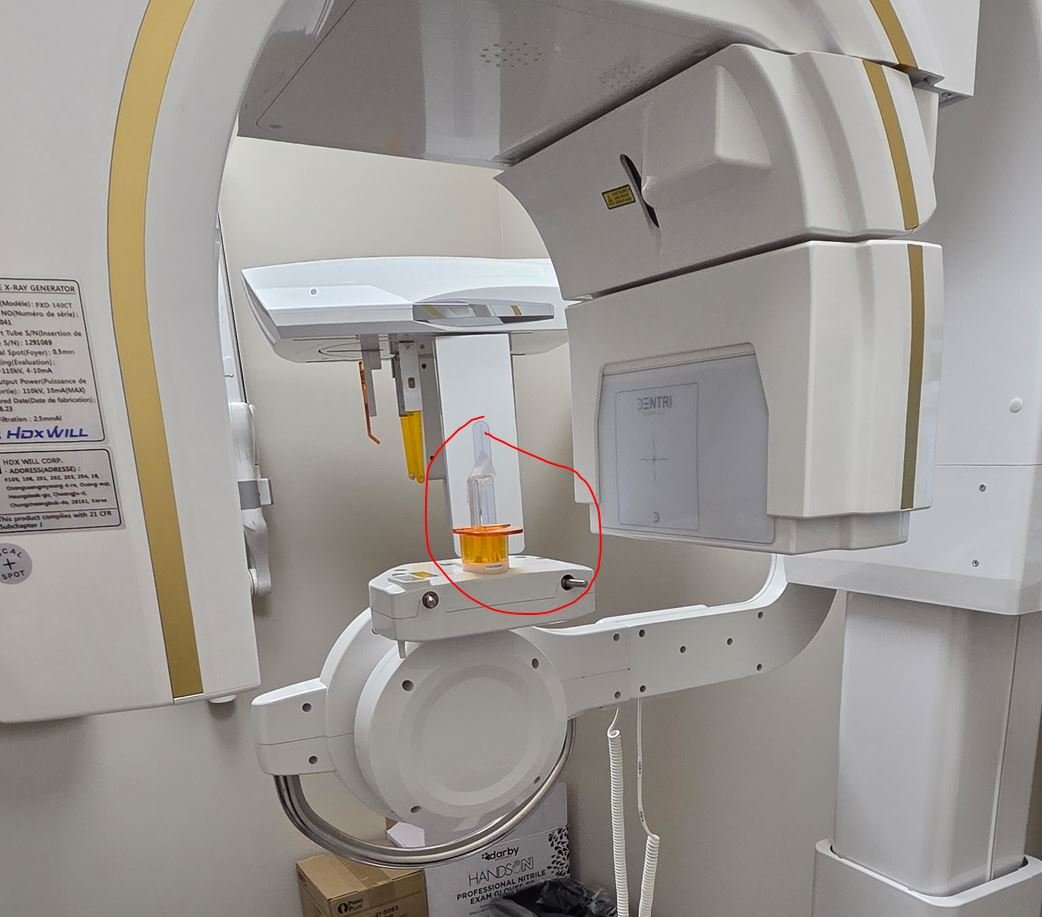
Bite Block
STEP 1 OF 20
Select the Patient in Open Dental
Go to the Appointment Module in Open Dental.
Find the correct patient and click once on the patient's name / appointment.
VERIFY THE PATIENT
Always make sure the correct patient is selected before opening the imaging software.
Always make sure the correct patient is selected before opening the imaging software.
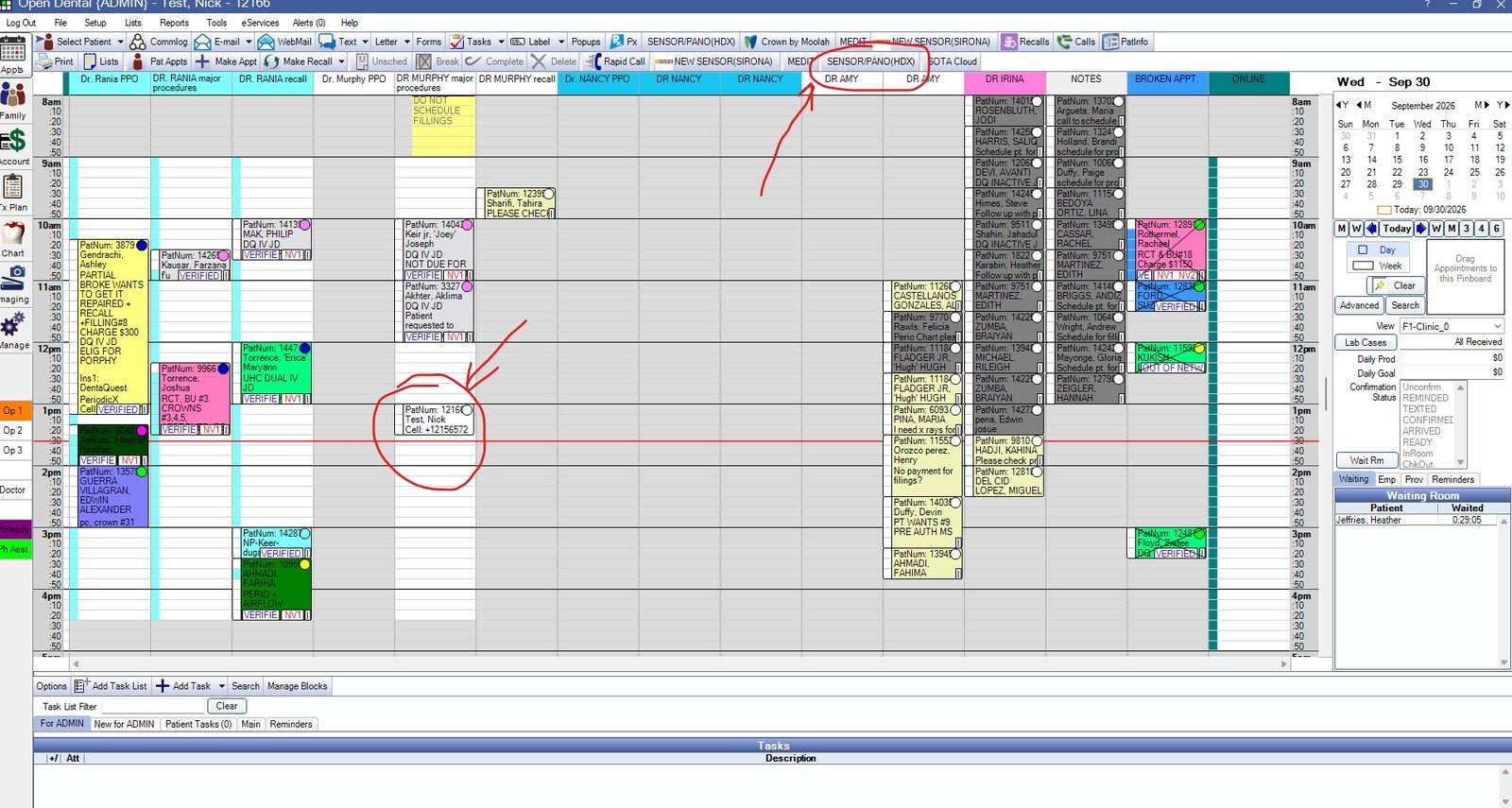
STEP 2 OF 20
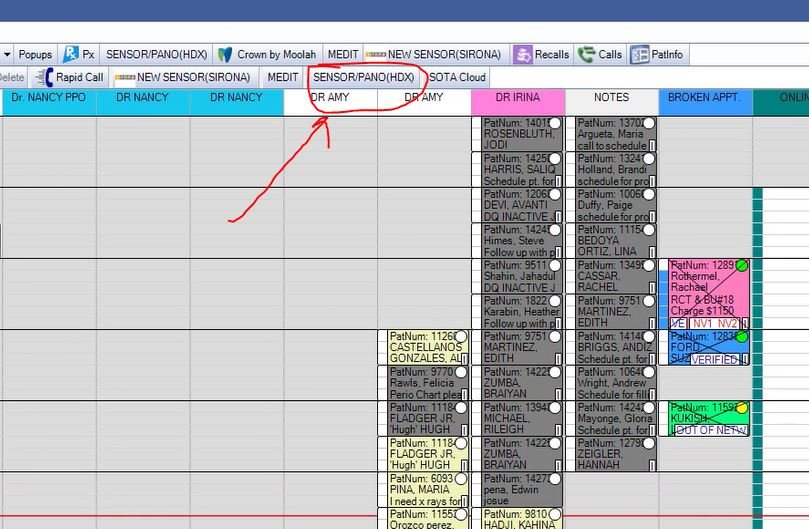
Click SENSOR/PANO (HDX)
After selecting the correct patient, click SENSOR/PANO (HDX).
This opens the HDX imaging software for the selected patient.
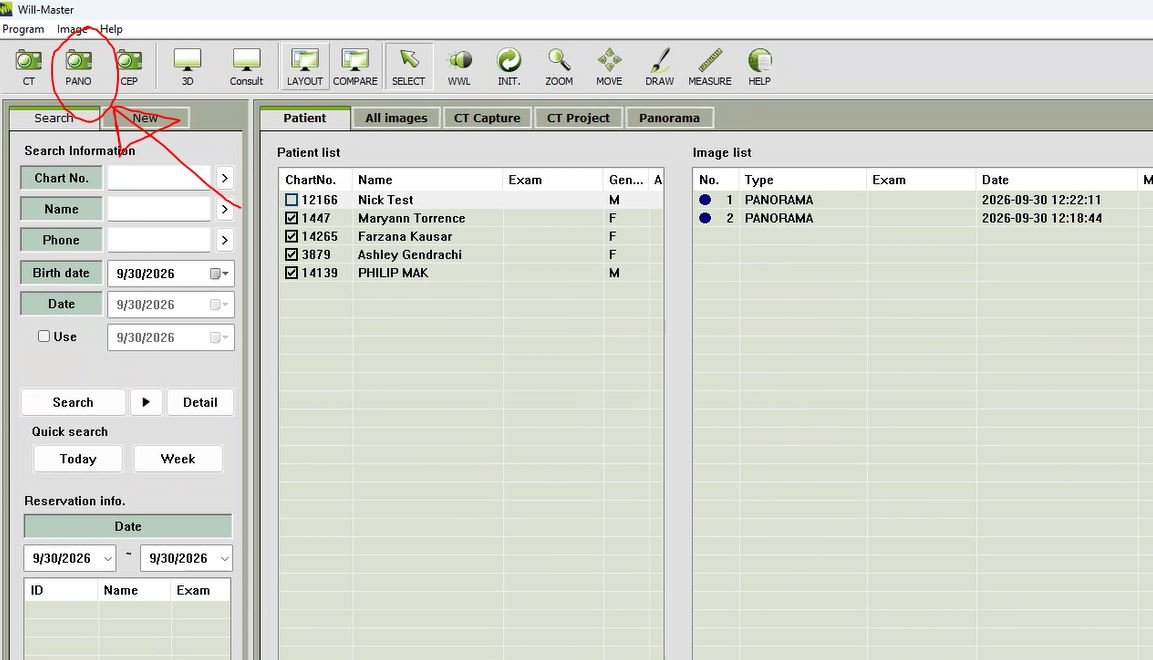
STEP 3 OF 20
Click PANO
The HDX imaging window will open.
Click PANO to open the panoramic capture screen.
STEP 4 OF 20
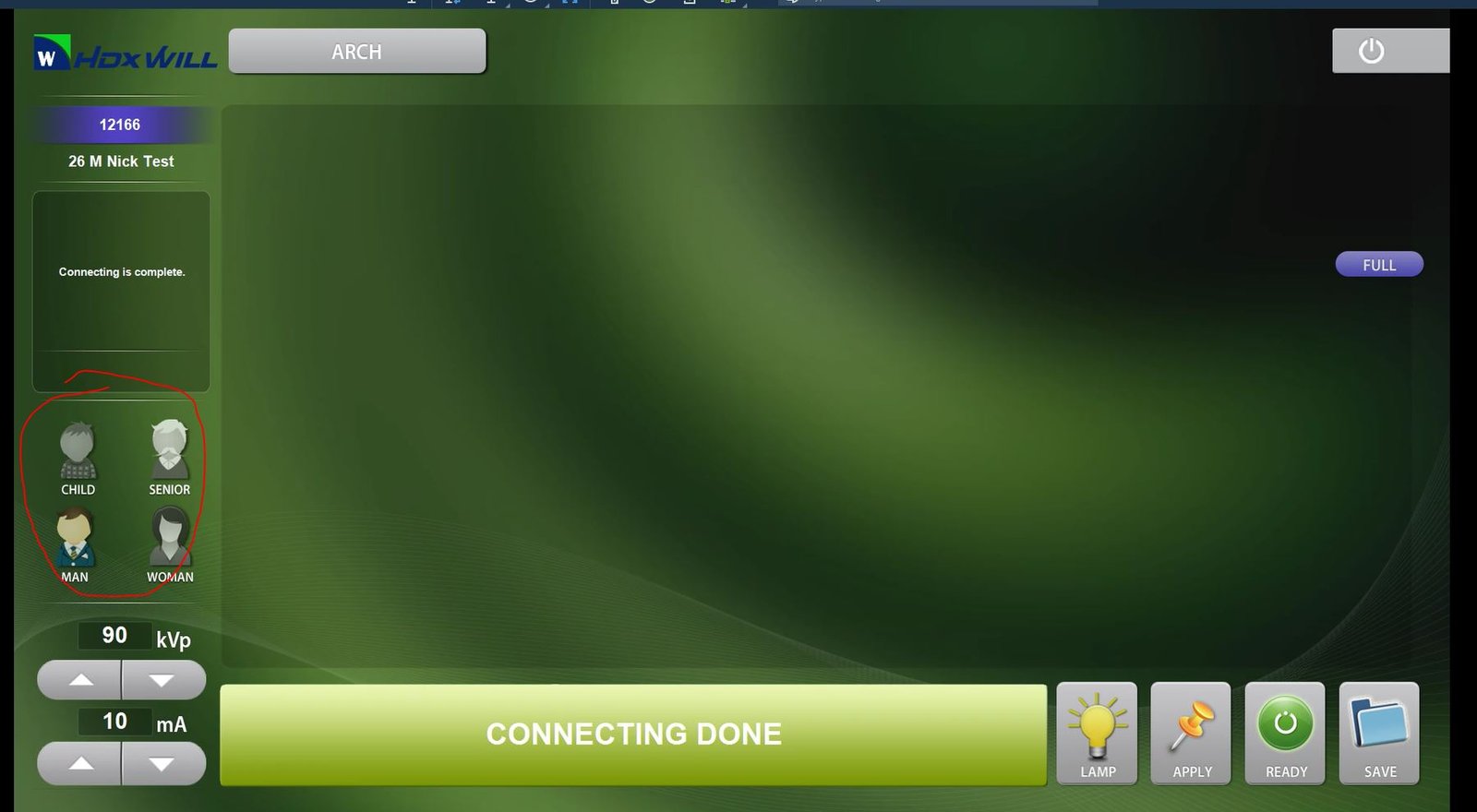
Select the Patient Mode
Choose the appropriate mode:
✓ CHILD
✓ MAN
✓ WOMAN
This selects the appropriate programmed exposure settings.
STEP 5 OF 20
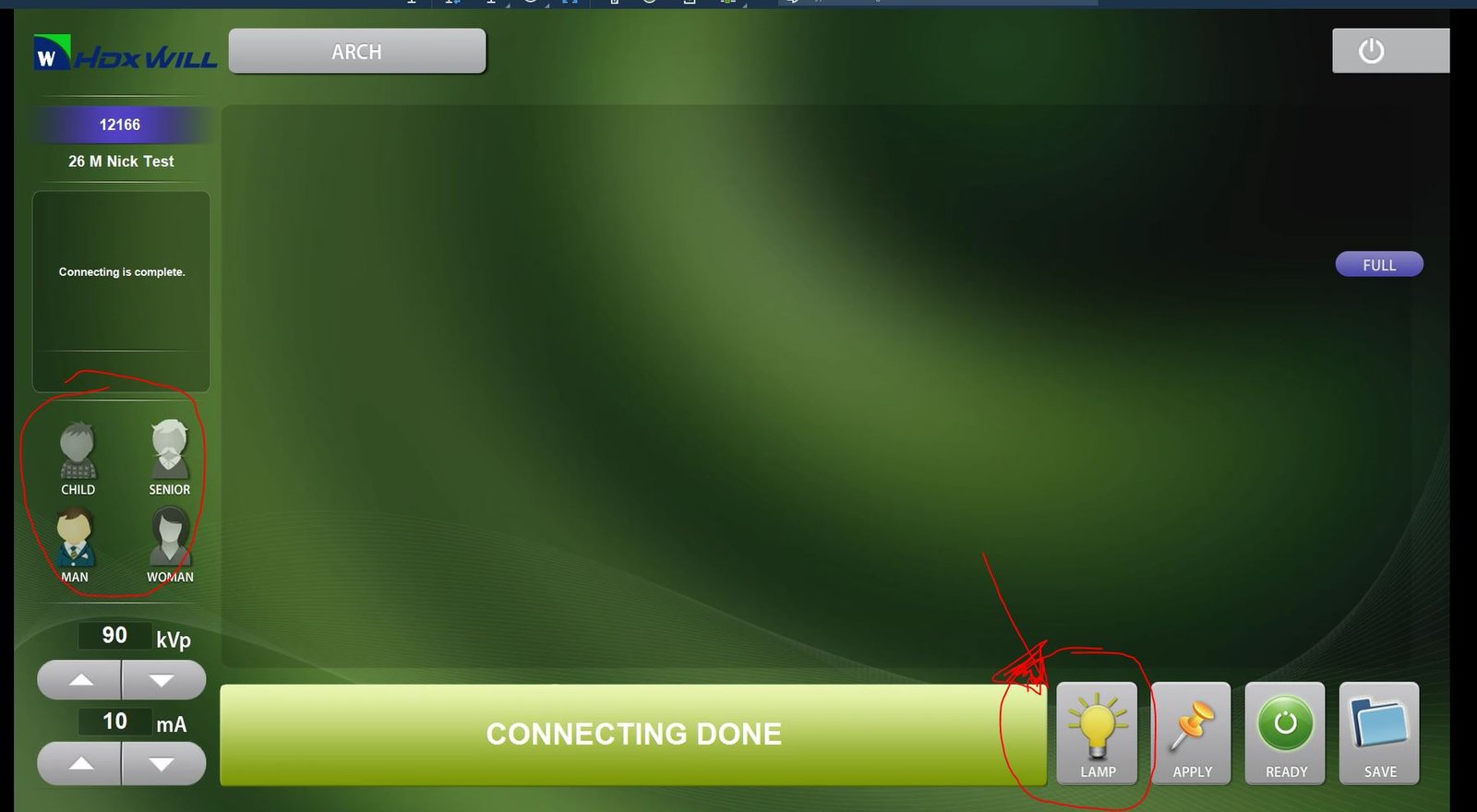
Turn On the Positioning Lamp
Click LAMP.
The positioning lamp helps you properly align the patient.
STEP 6 OF 20
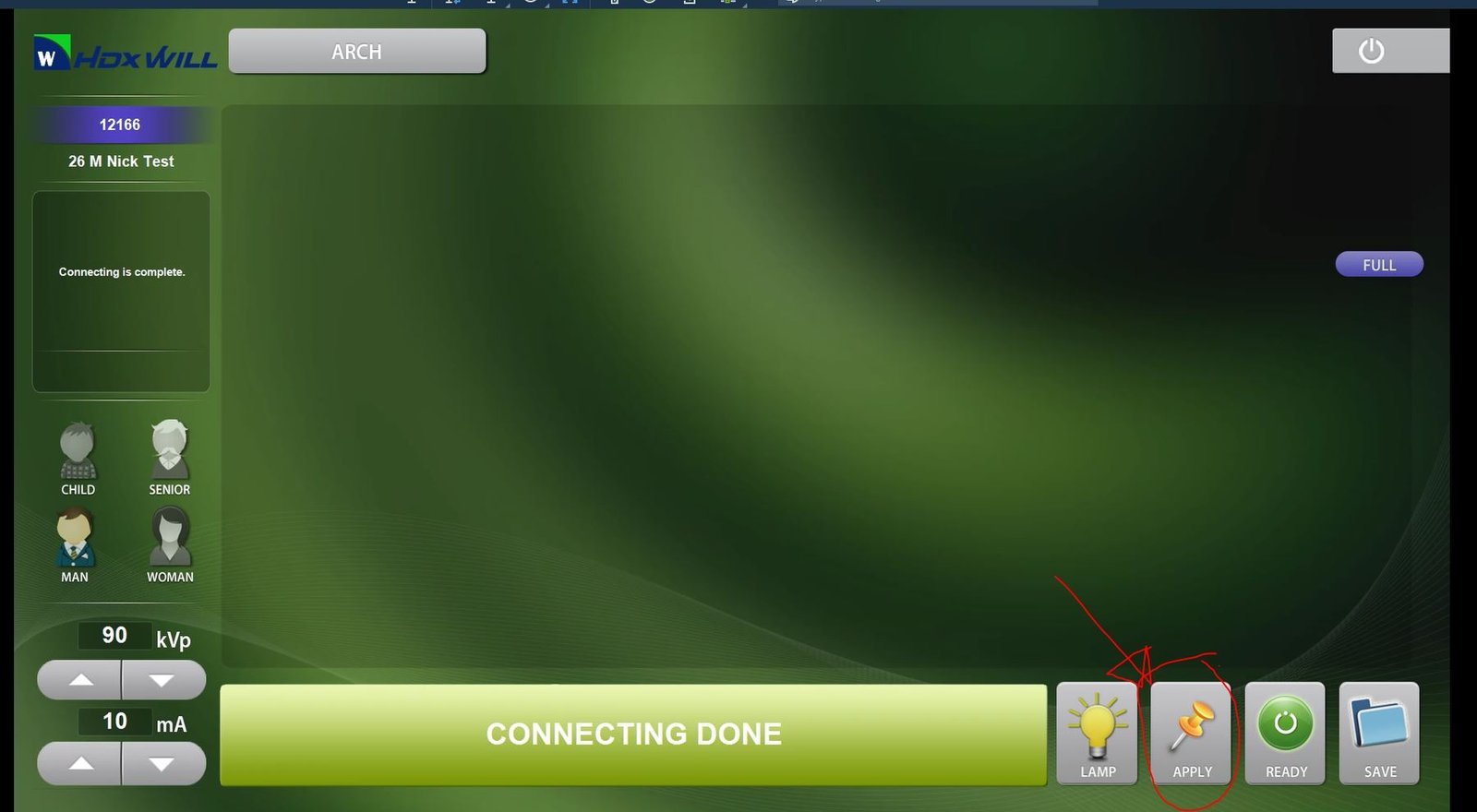
Click APPLY
After selecting the patient mode and turning on the lamp, click APPLY.
COMPUTER SETUP COMPLETE
Next, prepare the bite block.
Next, prepare the bite block.
STEP 7 OF 20
Prepare the Bite Block
✓ Put on gloves.
✓ Place a new bite block cover over the bite block.
THE MACHINE IS NOW PREPARED.
Only now should you call the patient.
Only now should you call the patient.
STEP 8 OF 20
Call and Escort the Patient
Call the patient by name and personally walk them to the panoramic X-ray area.
“Hi, I'm going to take your panoramic X-ray now.”
ESCORT — DON'T POINT.
Walk with the patient.
Walk with the patient.
STEP 9 OF 20
Remove Jewelry and Removable Teeth
Ask the patient to remove anything that may interfere with the image.
✓ Earrings
✓ Nose jewelry
✓ Tongue jewelry
✓ Other removable facial jewelry
✓ Dentures
✓ Partial dentures
✓ Other removable dental appliances
CROWNS AND BRIDGES ARE OKAY.
Fixed crowns and fixed bridges do not need to be removed.
Fixed crowns and fixed bridges do not need to be removed.
STEP 10 OF 20
Ask About Pregnancy
Before taking the X-ray, ask:
“Is there any chance you may be pregnant?”
YES, MAYBE, OR UNSURE = STOP.
Do not proceed. Ask the dentist.
Do not proceed. Ask the dentist.
STEP 11 OF 20
Place the X-Ray Shield
Place the approved panoramic lead apron / X-ray shield on the patient according to Smile Center protocol.
Make sure it is positioned properly and comfortably.
STEP 12 OF 20
Position the Patient
✓ Guide the patient into the panoramic machine.
✓ Place the patient's chin on the chin rest.
✓ Ask the patient to bite down on the tip of the bite block.
✓ Use the positioning lamp to help align the patient.
POSITIONING MATTERS.
Do not rush this step.
Do not rush this step.
STEP 13 OF 20
Offer the Hand Rails
Once positioned, offer the handles for stability.
“You can hold onto the rails for stability.”
Ask the patient to remain still.
FINAL CHECK
Jewelry removed • removable appliances removed • pregnancy question completed • shield placed • chin positioned • bite correct • patient stable.
Jewelry removed • removable appliances removed • pregnancy question completed • shield placed • chin positioned • bite correct • patient stable.
STEP 14 OF 20
Click READY
Once the patient is correctly positioned, click READY.
PATIENT POSITIONED → READY
STEP 15 OF 20
Exit the Panoramic Room
After clicking READY, leave the panoramic room and go to the exposure control.
The patient should remain still.
STEP 16 OF 20
Press and Hold the Exposure Button
PRESS → HOLD → WAIT UNTIL THE MUSIC STOPS
Press the exposure button and continue holding it throughout the exposure.
DO NOT RELEASE EARLY.
Hold the button until the music / exposure cycle stops.
Hold the button until the music / exposure cycle stops.
STEP 17 OF 20
Release the Patient
Return to the patient after the exposure is complete.
“You can let go now and take a step back.”
Help the patient safely step away from the machine.
STEP 18 OF 20
Mark the Routing Slip
The routing slip must stay with the patient workflow.
Mark the panoramic X-ray as completed.
IF IT WAS COMPLETED, MARK IT.
Never depend only on memory or verbal communication.
Never depend only on memory or verbal communication.
STEP 19 OF 20
Determine Where the Patient Goes Next
Check the patient's current status in Open Dental.
ARRIVED
The front desk still has administrative or financial items to complete.
✓ Bring the patient back to the front.
✓ Bring the routing slip with the patient.
✓ Allow the front desk to complete paperwork, insurance, signatures, or financial items.
READY TO GO BACK
The necessary front-desk requirements have been completed.
✓ If an operatory is available, escort and seat the patient.
✓ If no room is available, the patient may temporarily return to the waiting room.
✓ The patient does not need to return to the front desk unless necessary.
“Your X-ray is being processed. We will call you in a few minutes.”
STEP 20 OF 20
Complete the Patient Handoff
YOU OWN THE HANDOFF.
Your responsibility does not end when the panoramic X-ray is complete.
Your responsibility does not end when the panoramic X-ray is complete.
✓ Know where the patient is.
✓ Make sure the routing slip follows the patient.
✓ Monitor for an available room when appropriate.
✓ Make sure the assistant knows the patient is ready.
✓ Hand the patient off to the assistant or appropriate clinical team member.
DO NOT FORGET THE PATIENT.
✓
TRAINING COMPLETE
The Smile Center Standard
To the patient, the panoramic X-ray process should feel simple, organized, professional, and effortless.
PREPARE FIRST.
MOVE WITH PURPOSE.
KEEP THE PATIENT INFORMED.
COMPLETE THE HANDOFF.
MOVE WITH PURPOSE.
KEEP THE PATIENT INFORMED.
COMPLETE THE HANDOFF.
The goal is for every patient to feel that Smile Center was ready for them.